
How to keep AI-written property descriptions accurate
Give your team a consistent way to check AI-written listing copy, spot unsupported claims and refer difficult descriptions to a manager.

An inaccurate AI-assisted listing description can still read well.
The second problem is harder to spot. Five negotiators can use the same AI listing description writer and still produce five different standards of copy. One person checks every claim against the floorplan. Another trusts the draft because it reads well. Someone else pastes in old wording from a similar property. The manager only sees the description when a seller queries it, a buyer complains, or the branch has to explain why the listing promised something the property did not offer.
The branch needs a consistent review process.
AI can help agents turn rough notes into a usable draft faster. Once several people in a branch are using a real estate listing description generator, though, the manager’s job changes. You need a practical way to decide which descriptions can go live after normal review, which ones need evidence, and which ones need approval before publication.
The branch risk is uneven judgement
Most advice about real estate copywriting focuses on the individual writer: use specific details, avoid cliches, describe benefits, keep it readable, and do not exaggerate. Useful advice, but not a management system.
A branch manager needs agents to apply the same standards when they check a description.
The risky cases are usually easy to describe once you know what to look for. The AI draft adds lifestyle claims that were not in the notes. The description mentions extensions, conversions, parking, rights, or development potential. Photos, floorplan, and text drift apart after late edits. A seller asks for flattering wording that softens a defect. A junior team member uses a saved prompt or old template and carries an old mistake into a new listing.
Professional standards point the same way. In the UK, National Trading Standards guidance on material information in property listings pushes agents to establish and disclose important information earlier. The Property Ombudsman publishes Codes of Practice for property agents that reinforce accurate, transparent agency practice. In Australia, the ACCC says agents must not mislead consumers about property information in its real estate consumer guidance.
Each market has its own requirements, so check the claims as carefully as the wording.
Do not review every description the same way
If every AI-assisted description requires manager review, the queue gets too long and urgent listings bypass it.
Reserve manager review for descriptions with claims or issues that need it. Standard descriptions can move through a normal check. Higher-risk descriptions should slow down.
Here is a simple branch-level threshold:
| Description state | Normal owner | Manager action |
|---|---|---|
| Standard residential listing with complete notes, current photos, matching floorplan, and no unusual claims | Listing owner or marketer | Spot check a sample each week |
| AI draft contains unsupported adjectives, inferred benefits, or local terminology the branch avoids | Listing owner | Rewrite before submission |
| Copy mentions building works, planning, parking, access, tenure, utilities, flood risk, restrictions, or seller-specific claims | Senior agent or manager | Review evidence before publication |
| Seller asks for wording that changes the impression of a known issue | Manager | Decide what can be said fairly and record the approval |
| New starter, new template, new prompt, or repeated corrections from the same person | Manager | Review until the pattern is fixed |
This protects management time and gives the team a shared standard. Agents should apply the same checks to claims, evidence, fairness, tone, and approval.
Tell the reviewer what needs checking
The manager queue should not say “please check this.” That is too vague. It turns every task into a full reread.
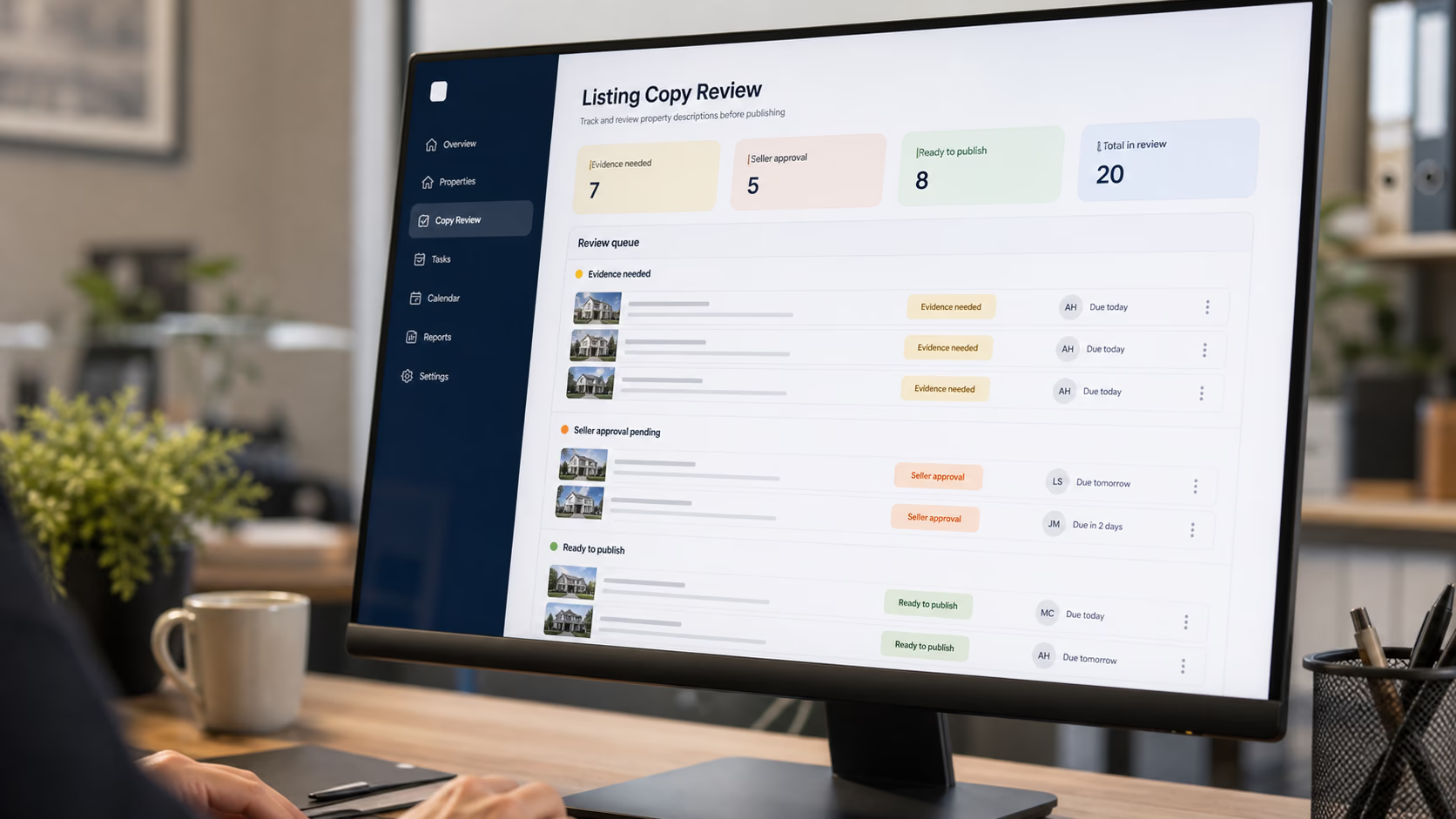
A useful queue tells the reviewer why the description needs attention. “Can you check the listing copy?” forces the manager to rebuild the whole property story from scratch. “AI draft says ‘recently renovated kitchen’. Evidence needed from inspection notes or seller confirmation” gives the manager a decision: approve, amend, or remove the claim.
The same applies to seller wording. “Seller wants ‘private parking’ but notes say shared driveway” is a clear review task. So is “description mentions home office potential, but the floorplan labels the room as storage.” The reviewer can decide whether the claim is fair instead of rereading every line as if nothing has been checked.
In AvaroAI, a listing can hold its property data, photos, documents, notes, tasks, events, and approval state in the same record. The manager should not have to hunt through a shared drive, a photographer email, a private note, and a chat thread just to decide whether one sentence is safe to publish.
Copy review works best when the review task is attached to the listing, because the listing is where the evidence lives. A task like “claim needs evidence” should carry the sentence, the source material, the owner, and the condition for clearing it.
Give the team rules they can actually apply
Most branches do not need a 20-page writing policy. They need review rules that agents can remember while preparing a listing.
Give agents a short set of rules:
| Rule | What it means in practice |
|---|---|
| No unsupported upgrades | Words like renovated, upgraded, newly fitted, luxury, or bespoke need a source |
| No hidden constraints | Material limits should not be softened by vague positive language |
| No room-use invention | A room can be described by current use, intended use, or potential use only when the evidence supports it |
| No photo contradiction | If the copy highlights a feature, the media set should not undermine it |
| No template carry-over | Saved phrases from old listings must be checked against the current property |
| No seller-only wording without review | Seller preferences can inform copy, but they do not replace agent judgement |
This matters when someone searches for advice on how to write a real estate listing and comes back with a generic structure: headline, opening hook, features, lifestyle benefit, call to action. That structure can help, but it does not tell an agent which claims need proof.
For managers, the most useful rule is the claim test:
| Claim type | Reviewer question |
|---|---|
| Physical fact | Where is it recorded? |
| Condition claim | Who verified it and when? |
| Lifestyle benefit | Is it a fair inference from the property, location, and media? |
| Local phrase | Would a buyer understand it the way the branch intends? |
| Future potential | Is this presented carefully enough, or should it be removed? |
Now the branch has a common language. Instead of arguing about whether copy “sounds good,” the team can ask whether the claim is supported, fair, and clear.
Manager visibility is the missing control
AI copy tools make production faster, but they can also hide weak process. A manager may not know which descriptions were AI-assisted, which template was used, or which claims were added after approval.
That lack of visibility creates two problems.
First, the manager cannot spot repeated issues. If three people keep using “recently refurbished” too loosely, that is a training and template problem, not three isolated edits. Second, the branch cannot prove how a decision was made if a seller challenges the wording or a buyer says the listing gave the wrong impression.
AvaroAI’s role-based access and team visibility are useful here because the manager can see review status without taking over every listing. A senior person should be able to filter for descriptions awaiting approval, claims that need evidence, seller wording requests, and listings where the copy changed after approval.
This lets the manager check standards across the branch.
Review a sample each week
A short weekly review can catch recurring mistakes.
Use this as a starting point:
- Review every escalated description before publication.
- Sample a small set of standard AI-assisted descriptions each week.
- Track recurring corrections by person, template, prompt, and property type.
- Update the branch rules when the same issue appears twice.
- Keep the final approval decision attached to the listing.
It is easy to fix the words and forget to save the approval decision. Then the same question comes back when the listing is edited, reduced, withdrawn, or handed to another agent.
If your branch already has a process for reviewing property-file exceptions, copy control should feel familiar. You are not auditing everything with equal intensity. You are finding the cases where a public claim, missing evidence, seller request, or AI-generated phrase creates enough risk to slow down and review properly.
For the writing side, good listing copy still starts before the writing does. But once AI enters the team process, the manager needs one more layer: a visible standard for deciding which descriptions are routine, which are exceptions, and which are not ready to publish.

Turn recurring corrections into team guidance
AI-assisted listing copy should not turn managers into editors for every property. That does not scale, and it is not the best use of senior judgement.
The manager’s job is to create enough structure that the branch can move quickly without letting polished but unsupported wording slip through. Agents can approve routine copy, refer uncertain claims to a manager, and keep the decision with the listing. Use repeated corrections to improve training or templates.
Related reading
Disclaimer: This page may contain AI-assisted content. The information is provided solely as a general guide and may not be correct, complete, or current, including, but not limited to, our full or applicable service offerings. While we strive for accuracy, no guarantee is made regarding correctness or completeness, and no expectation should be made as such.